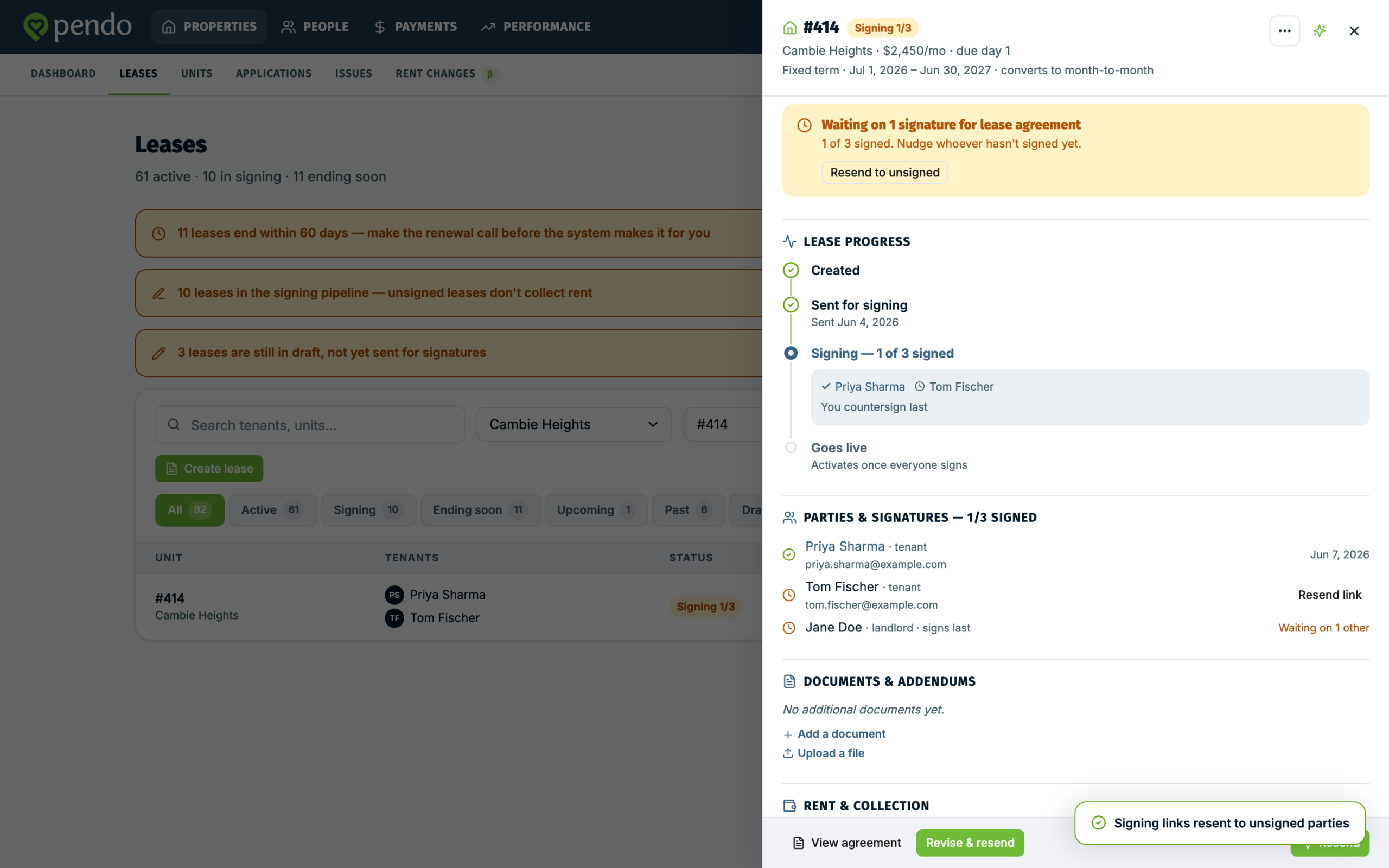
This article covers Pendo Rent 2.0 screens. Which screens a lease opens depends on the lease itself, not your account switch. Not sure which you're looking at? See: Which version am I looking at?
Short answers to what tenants call you about. One rule underneath most: a resend sends the same link again, and only a corrected email address or a revision replaces it.
"I never got the email" #
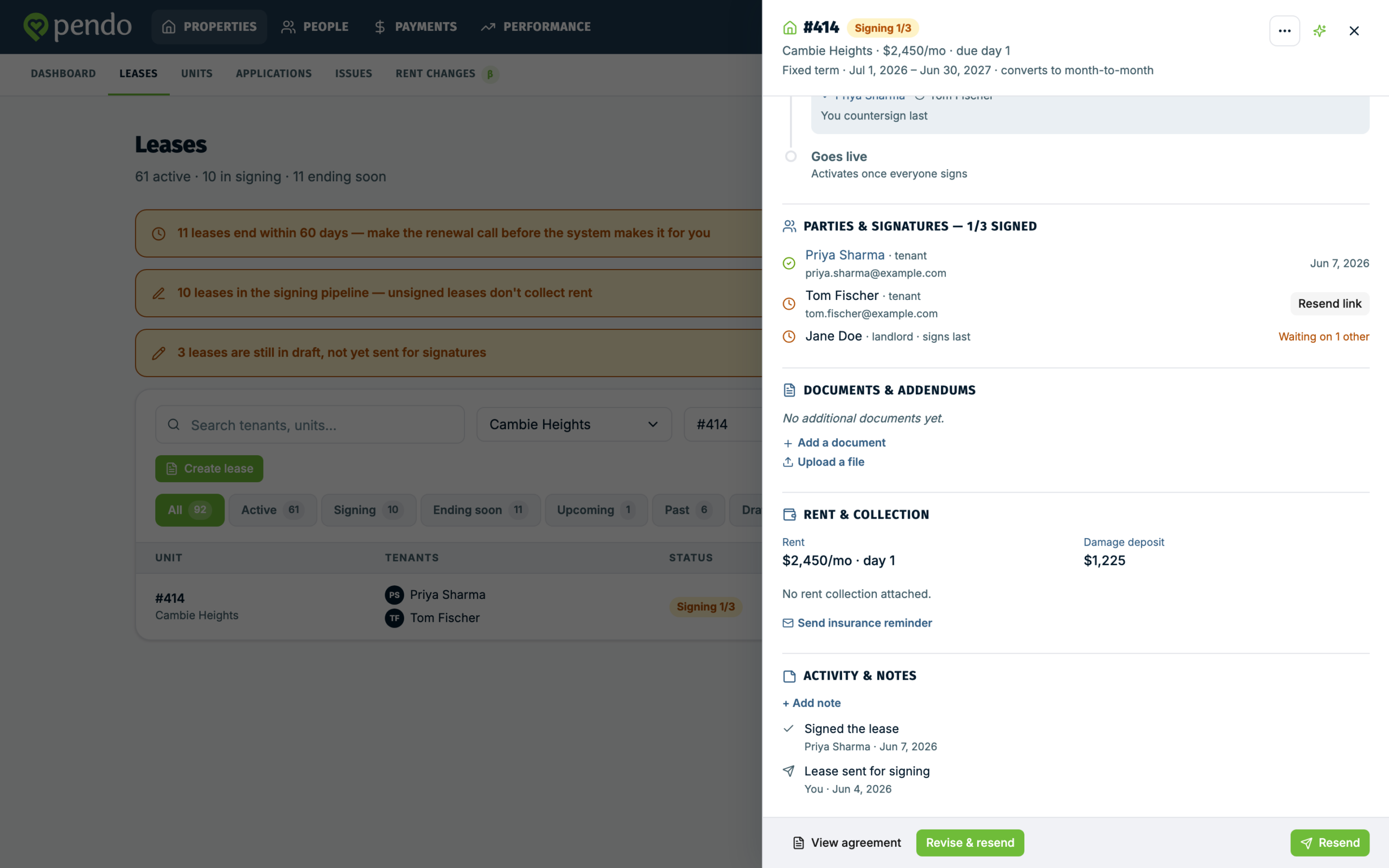
- Open the lease and go to Parties & signatures.
- Check the email address on that tenant's row. A typo is the usual cause.
- If the address is right, use Resend link on their row, and ask them to check spam.
A resend sends the same link again, so an older Pendo email they dig up still works.
If the address is wrong, fix it on the person, then resend.
- Open People and click the tenant.
- Click Edit profile, top right of their profile card.
- Change the Email field, then save.
- Go back to the lease. The tenant's row now shows both addresses, Saved lease email and Current People email, with a line saying which one a resend will use.
- Use Resend link.
No Email field on the profile? Untick Tenant does not have an email address and it appears. That tick box is often the real problem: a tenant carrying it cannot be sent anything at all.
Don't go looking in View all on the Contact card. It shows their details and lets you copy the email, it does not edit them.
While nobody has signed, the resend goes to the corrected address and that person gets a fresh link. Pendo confirms it: "Recipient email updated. Earlier signing links for changed recipients no longer work."
Once somebody has signed, a resend still uses the address saved on the lease, and the row says so. The fix then is Revise & resend, which picks up the corrected address and sends everyone a fresh link. Everyone who had signed signs again.
"The signing link doesn't work" #
Before everyone has signed, a link stops working for one of four reasons: the lease was revised, that person's email address was corrected, the lease was ended, or its term ran out. In the first two cases a newer email carries a working link.
Ask them to open the most recent email. If they cannot find it, use Resend link.
After everyone has signed, the link opens the signed lease instead, for at least a year after signing. If an old link has stopped opening a signed lease, open the lease, use View agreement, download the signed lease and send it to them.
"I sent it to the wrong address" #
Correct the address first, on the person in People, as above. The tenant's card on the lease shows the address but does not edit it. What happens next depends on whether anyone has signed.
If nobody has signed yet, resend. The right person gets a fresh link, and the link sitting in the wrong inbox stops working.
If somebody has already signed, the lease offers Revise & resend instead. It rebuilds the lease, issues fresh links, and stops the old ones working, including the one in the wrong inbox. Everyone signs again.
Switching off a link stops someone signing. It does not unsend what they may already have read. If the lease reached a real person who should not have seen it, contact us.
"Did it even arrive?" #
If a tenant's email address bounces, Pendo emails you an alert naming the message that failed. That email is the whole signal: the lease row does not change status, so a lease that looks fine may have a tenant with nothing. The same alert covers any Pendo email to that person, not just the signing invite.
Check the address on Parties & signatures, fix it, and resend.
"It says nothing was sent" #
Before it emails anyone, Pendo produces the lease as a PDF. If that fails you see "We couldn't prepare the lease document, so nothing was sent." It means exactly that: nobody has been emailed and the lease is unchanged. Try sending again. If it keeps failing, contact us.
"The resend says Pendo Rent could not send the lease" #
Refresh the lease and try once more. That message usually means the lease changed while you had it open.
If it keeps happening on an older lease, one you sent before Pendo started producing leases as PDFs, and somebody has already signed it, a plain resend is not possible. The lease has to become a PDF first, and the people who signed did not sign that PDF. Use Revise & resend: everyone gets a fresh link and signs the PDF, including the people who had already signed.
"Everyone signed, but I can't open the signed lease" #
The signed PDF usually takes a moment to produce after the last signature. In that moment the lease says The signed lease is being prepared. Use Check again. Everyone is emailed the signed copy as soon as it is ready.
If it says The signed lease couldn't be produced, the signatures are safe and nothing is lost. Nobody needs to sign again. Contact us and we will help you get the signed document.
"This looks like a scam" #
A fair instinct, worth taking seriously. Pendo has a short article for tenants that walks them through it: Is this signing email real?. Send it.
The short version: the email names you, the signing button goes to an address starting https://app.pen.do/, and Pendo never asks for a SIN, banking details, or a password. No account to create.
Tell them not to forward it. Anyone holding the link can sign as them.
"One of us signed, the other hasn't" #
Until every tenant has signed, the lease is not final and you cannot countersign. A tenant who has signed sees they are waiting, and gets no email until it completes.
Use Resend to unsigned at the bottom of the lease to nudge everyone outstanding. Resend link on a single row does the same thing, so either way every unsigned party gets another email. There is no way to nudge just one person.