
Pendo Rentals
MenuMenu
proudly canadian
  • Features
  • Pricing
  • Support
  • Blog
  • Contact
  • Sign in
  • Try It Free
Sign Up right arrow Tenant Portal right arrow proudly canadian

Support More

  • Getting Started
  • Try Pendo for Free
  • LandlordBC Members
  • Property Management / Company PendoPay FAQ
  • Landlord PendoPay FAQ
  • Tenant PendoPay FAQ
  • Owner PendoPay FAQ
  • How your rent amount is calculated
  • How do I order a Tenant Screen or Credit Report?
  • What does a tenancy screening request look like?
  • How do I update my Deposit and/or Fee bank accounts?
Are you a tenant? Submit an issue
PendoPay
View Categories

How do I change who pays the transaction fee?

< 1 min read

Once PendoPay is set up for a tenant, you can choose whether the landlord pays the transaction fee or whether the fee is passed on to the tenant. PendoPay transactions are $2.50-$3.00 per transaction and landlords can choose to cover the fee or pass it along.

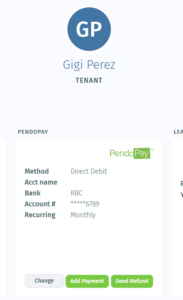
If you want to change who pays the fee, go to the tenant’s profile and click Change on the PendoPay card.
Then click the Fees Paid By section and select the other payee.
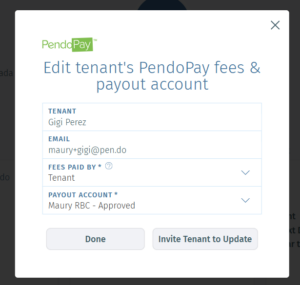
Click Done to save the change.

Note: This update applies to the next PendoPay payment. It does not affect payments that are already in processing. Pendo’s public PendoPay page also makes clear that payments are tracked by status from submission through deposit, so once a payment is already underway, this type of change would not apply retroactively.

Back to top
Pendo Rentals
  • Features
  • Pricing
  • Blog
  • Support
  • About
  • Contact
  • Legal
  • Manager Sign In
  • Tenant Portal
©2025 Made in Canada
Rental Operations Readiness Scorecard

Rental Operations Readiness Scorecard • Pendo

Calculator
Tenant Insurance / Renters Insurance

Get a free quote from one of our insurance partners when you sign up.

Learn more
Calculator
Home Insurance & Landlord Insurance

Get a free quote from one of our insurance partners when you sign up.

Learn more
MagnifyingGlass
Tenant screening, softcheck, credit reports

Pendo has two types of reports to suit both your budget and screening requirements.
certn&equifax

Learn more
Pencil
Move in/out inspection app

Generate a Condition Inspection Report as you walk through the rental with your new tenant.

  • Mark its condition
  • Capture photos
  • Add any notes
Apple Store
Google Play
FolderUser
Tenant onboarding and workflow management

Automate the most time-consuming steps so you can focus on choosing the right tenants.

Learn more
ShareFat
Advertise listings and collect applications

Easy to market your rental, attract great tenants, and stay organized every step of the way.

Learn more
Table
Reports for cashflow, finance tracking, bookkeeping

Financial reports to solve your quarterly and year-end headaches.

Learn more
PresentationChart
Powerful property management dashboard

Save time and have a clearer financial picture of your rental properties.

Learn more
ClockClockwise
Automatic rent collection2 with PendoPay™

Effortless automatic rent collection with secure pre-authorized debit transactions.

Learn more