
This article covers Pendo Rent 2.0 screens. Which screens a lease opens depends on the lease itself, not your account switch. Not sure which you're looking at? See: Which version am I looking at?
Every fixed-term lease needs a decision before it runs out: renew it, let it roll month to month, or end it. Pendo calls that the renewal, and you can set it at any point in the term. Pendo says so itself: anytime, not just in the last 60 days before the end date. Pendo also emails you reminders as the end date approaches, starting about five weeks out, so the decision does not sneak up on you.
Where it lives #
Open the lease and find Renewal. It shows when the term ends, how many days that is, and what is currently planned.
Renewal only appears on an active fixed-term lease that has an end date. A month-to-month lease has no term to renew, and a lease with a termination saved on it shows the termination instead.
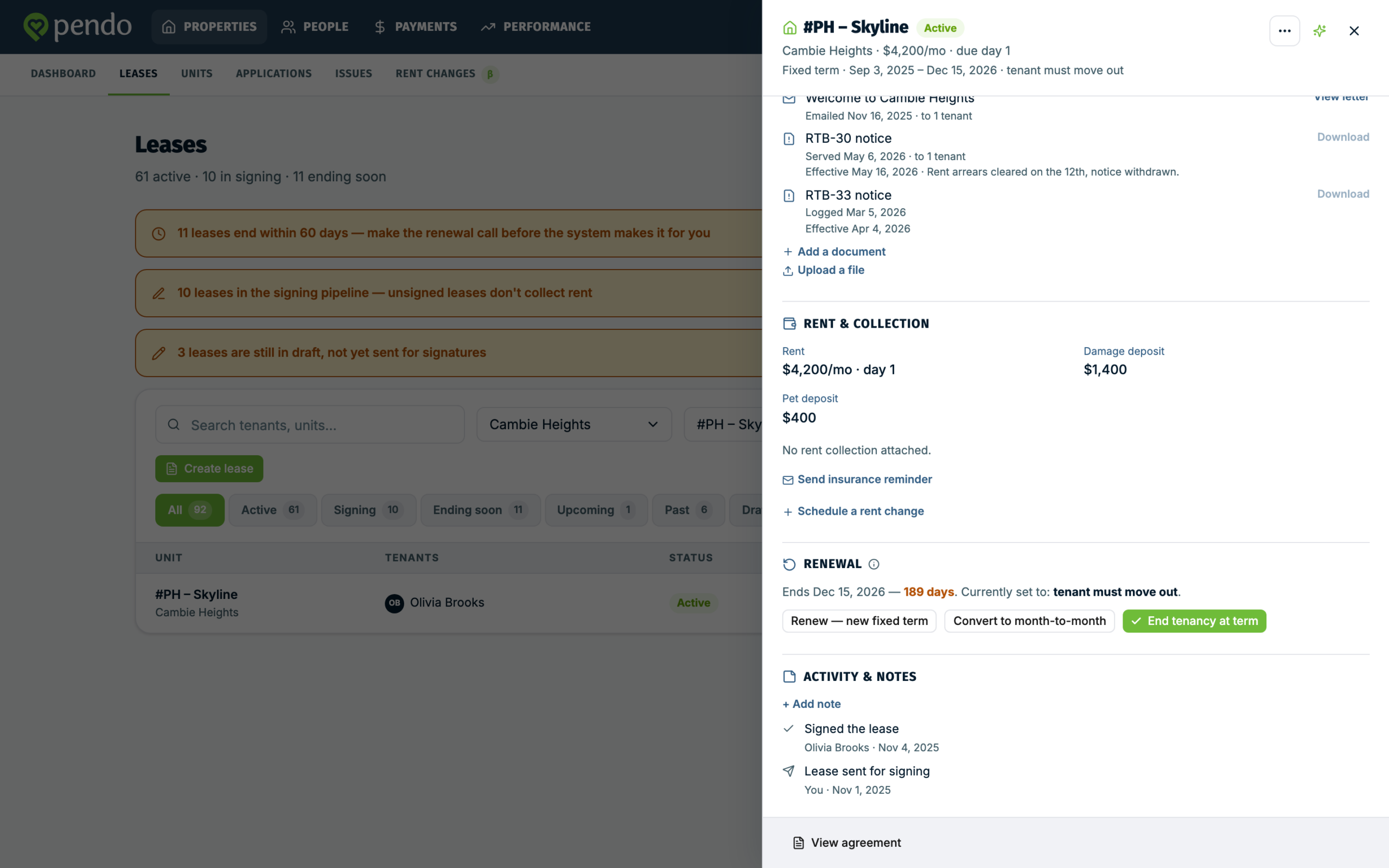
The three choices #
Renew for a new fixed term. Pendo asks for the new end date. The new term starts the day after the current one ends, so you only pick the far end. The date has to be later than the current end date.
Convert to month-to-month. The tenancy continues with no fixed end after the term runs out.
End tenancy at term. The tenant is expected to move out on the end date. This is the end-of-term plan, not an early termination. If you need to end a tenancy before its term is up, that is Ending a lease instead.
Whichever is currently set is shown with a tick, and you can change it as many times as you like before the term ends.
What happens if you do nothing #
A fixed term that reaches its end date with no plan set is auto-extended by one year. If that happens, the lease says so and points you back at the Renewal section to change it if it was not what you wanted.
That is worth knowing in advance, because "we will sort it out later" quietly becomes another twelve months.
Renewing changes the term, not the rent #
Setting a renewal does not change what the tenant pays. If the new term comes with a different rent, schedule that separately: see Rent changes.
Do both. A renewal with the old rent still attached is the kind of thing nobody notices until the first payment of the new term.
A lease that has already ended #
The Renewal section is not available once a lease is no longer active, so you cannot reach back and renew an expired one. Create a new lease for the unit instead: see Creating and sending a lease.
If the unit still shows the old lease as live, Replacing a tenant in a unit covers what to do.
A renewal you signed outside Pendo #
If you and the tenant signed a new agreement elsewhere, create a new lease for the unit and choose Record an already-signed lease. Pendo tracks it without sending anything for signing.
Building a new lease from the old one #
Where a renewal really is a fresh agreement rather than an extension of the term, Duplicate, in the three-dot menu at the top right of the existing lease, starts a new lease from its terms with the tenants, occupants and dates cleared. It saves retyping terms you are keeping, and you add the tenants again. Nothing is saved until you save a draft or send, nothing is sent to anyone, and the original is unchanged.